Have you considered how modern technology can secure your home? Smart locks not only elevate your security but also enhance convenience, making your daily routines simpler. Discover the essential insights about smart lock installation and maintenance below!
What You Will Learn
- Smart locks offer advanced security features such as remote access and temporary codes for guests.
- Choosing the right smart lock involves considering features like smartphone integration and auto-lock functions.
- Installation can be DIY for cost-effectiveness or professional for complex door systems; choose based on comfort and complexity.
- Regular maintenance, including cleaning and battery checks, is vital for ensuring your smart lock operates smoothly.
- Security goes beyond installation; enable two-factor authentication and regularly review user access for enhanced protection.
- Managing battery life is crucial; use quality batteries and monitor levels through the mobile app to avoid lockouts.
Smart Lock Installation & Maintenance Overview
This visual summarizes key considerations for smart lock users, from choosing installation methods to essential maintenance practices, highlighting the balance between security and convenience.
Installation Choices
DIY: Cost-effective, empowering, guides provided.
Professional: Ensures optimal setup for complex systems.
Key Maintenance Steps
Clean & lubricate mechanism regularly.
Monitor & replace batteries promptly.
Update software & check alignment.
Enhanced Security Tips
Enable 2FA on mobile app.
Regularly change PIN codes.
Review user access/permissions.
Key Features to Consider
Smartphone Integration.
Keypad Entry (backup).
Auto-Lock Function.
Understanding Smart Lock Installation for Your Home
Have you been considering upgrading your home security? Smart locks are a fantastic option to enhance your safety while adding a touch of modern convenience! These innovative devices not only keep your home secure but also allow you to control access remotely through your smartphone.
A smart lock is essentially a keyless locking system that can be controlled via a mobile app. With features like remote locking and unlocking, temporary access codes, and activity logs, you can easily monitor who enters your home and when. It’s a game-changer for homeowners looking to boost security and convenience!
What is a Smart Lock and How Does It Enhance Security?
Smart locks are designed to provide a more advanced level of security compared to traditional locks. They often include features such as encryption, biometric scanning, and compatibility with home automation systems. These enhancements not only protect your property but also ensure that only authorized users can access your home!
- Remote Access: Control your lock from anywhere using your smartphone.
- Temporary Codes: Generate unique access codes for guests or service personnel.
- Activity Monitoring: Keep a log of who enters and exits your home.
By utilizing these features, smart locks enhance your peace of mind. You no longer have to worry about lost keys or unauthorized entries. With a smart lock, security is quite literally at your fingertips!
Key Features of Smart Locks: Enhancing Home Security
When choosing a smart lock, there are several key features to consider. Each feature can significantly impact your home’s security and your overall experience. Here are some features that I recommend looking out for:
- Smartphone Integration: Ensure compatibility with your smartphone for easy access.
- Keypad Entry: A backup option for entry without a smartphone.
- Auto-Lock Function: Automatically locks the door after a predetermined time.
- Voice Assistant Compatibility: Works with your home assistant for hands-free control.
These capabilities not only enhance security but also streamline your daily routines. Imagine walking up to your door and having it unlock automatically as you approach—convenience and safety all in one!
DIY vs. Professional Installation: What You Need to Know
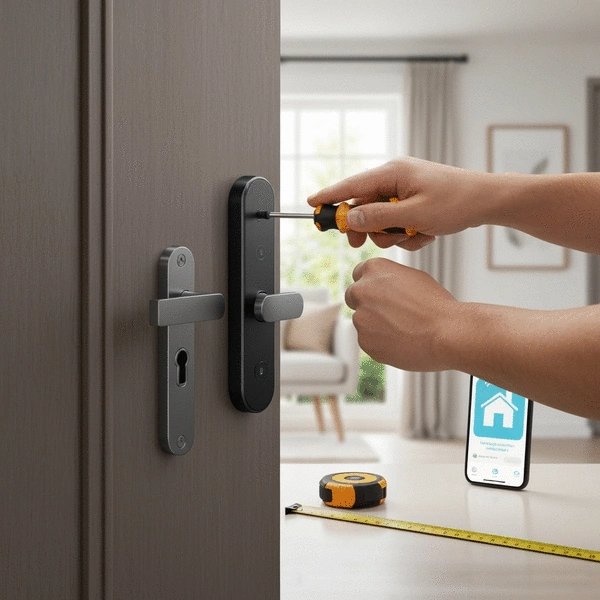
As you consider switching to a smart lock, the installation method is an essential aspect. You can choose to install it yourself or hire a professional. Both options have their advantages!
- DIY Installation: Typically more cost-effective and empowering. Most smart locks come with comprehensive installation guides!
- Professional Installation: Ideal if you’re not comfortable with DIY tasks or have complex door systems. It ensures that the lock is installed correctly for optimal security, as highlighted by KISI's access control installation guide.
At The Locksmith's Narrative, I often emphasize the importance of proper installation. Whether you decide to go DIY or hire an expert, ensure that the lock is installed securely to maximize its benefits. Always weigh your comfort level and the complexity of your existing door setup when making this decision! For more detailed guidance on smart door lock installation, resources like AAA's home security tips and Safe and Sound's blog on smart lock installation offer valuable insights.
Pro Tip
Did you know? Regularly changing your smart lock's access codes is a simple yet effective way to enhance your home security. This practice not only limits the risk of unauthorized entry but also allows you to maintain control over who has access to your home. Treat your smart lock like a digital safe—frequent updates keep your security tight!
Best Practices for Maintaining Your Smart Lock
Maintaining your smart lock is crucial to ensure its longevity and functionality. I often remind my clients that a little upkeep can go a long way. Regular maintenance helps keep your smart lock in prime condition, ensuring it provides reliable security for your home!
Here are some best practices to consider:
- Keep the lock clean and free of debris.
- Inspect the battery regularly and replace it when low.
- Check for software updates to ensure optimal performance.
- Test the locking mechanism occasionally to ensure it works smoothly.
Incorporating these practices into your routine will help you avoid unnecessary headaches down the line. Trust me, you'll appreciate the peace of mind that comes with knowing your lock is functioning perfectly!
Regular Maintenance Tips for Long-Lasting Performance
To keep your smart lock performing at its best, here are some quick maintenance tips:
- Wipe down the exterior with a damp cloth to remove dust and dirt.
- Lubricate the lock mechanism every few months with a silicone-based lubricant.
- Check the alignment of the lock with the doorframe to ensure a proper fit.
These simple steps can help extend the life of your smart lock. Remember, a well-maintained lock not only works better but also enhances your overall security.
Securing Your Smart Lock: Tips Beyond Installation
Installation is just the beginning! To truly maximize your security, you need to take additional steps after setting up your smart lock. Here are some strategies I always recommend:
- Enable two-factor authentication on your mobile app.
- Regularly review user access and permissions.
- Change your PIN codes periodically.
Implementing these security measures will help safeguard against unauthorized access. Don't forget, the more proactive you are, the better protected your home will be!
Battery Life Management: Ensuring Your Smart Lock Always Works
Managing battery life is essential for the uninterrupted performance of your smart lock. Here are a few tips to keep your lock powered up:
- Use quality batteries recommended by the manufacturer.
- Monitor the battery level through the mobile app.
- Replace batteries at the first sign of low power warnings.
By keeping an eye on battery life, you can prevent inconvenient lockouts. It’s a simple task that ensures your smart lock is always ready when you need it!
Frequently Asked Questions About Smart Locks
- Q: What are the main benefits of installing a smart lock?
- A: Smart locks offer enhanced security through features like remote access, temporary access codes for guests, and activity logs. They also provide significant convenience by eliminating the need for physical keys and allowing remote control via a smartphone.
- Q: What features should I look for when choosing a smart lock?
- A: Key features to consider include smartphone integration, keypad entry for backup, an auto-lock function, and compatibility with voice assistants for hands-free control. These features contribute to both security and ease of use.
- Q: Is it better to install a smart lock myself or hire a professional?
- A: DIY installation is cost-effective and empowering, especially if you're comfortable with basic tools and follow guides. Professional installation is recommended for those less comfortable with DIY tasks or for complex door systems to ensure optimal setup and security.
- Q: What kind of regular maintenance do smart locks require?
- A: Regular maintenance includes keeping the lock clean and free of debris, checking and replacing batteries promptly, performing software updates, and occasionally testing the locking mechanism for smooth operation. You should also lubricate the mechanism quarterly and check door alignment.
- Q: How can I further secure my smart lock after installation?
- A: Beyond installation, enhance security by enabling two-factor authentication on the mobile app, regularly reviewing user access and permissions, and periodically changing PIN codes. These practices help prevent unauthorized access.
- Q: What should I do to manage my smart lock's battery life effectively?
- A: To ensure uninterrupted performance, use quality batteries recommended by the manufacturer, monitor battery levels through the mobile app, and replace batteries at the first sign of a low power warning. This prevents unexpected lockouts.
Recap of Key Points
Here is a quick recap of the important points discussed in the article:
- Smart locks offer features like remote access, temporary codes for guests, and activity monitoring to enhance home security.
- Key features to look for include smartphone integration, keypad entry, auto-lock functions, and voice assistant compatibility.
- Consider your comfort level with installation; DIY can save costs while professional installation ensures optimal security.
- Regular maintenance is essential; keep locks clean, check battery levels, and stay updated on software for best performance.
- Implement security measures like two-factor authentication and regular reviews of user access to safeguard your smart lock.
- Manage battery life carefully to avoid lockouts; use quality batteries and monitor levels through the mobile app.